
NOLA.com
Georges Media (NOLA, The Advocate)News & Magazines
3.9651.00 Reviews
- Version
- 4.1.0
- Installs
- 100.00K
- Age Rating
- Teen
Screenshots

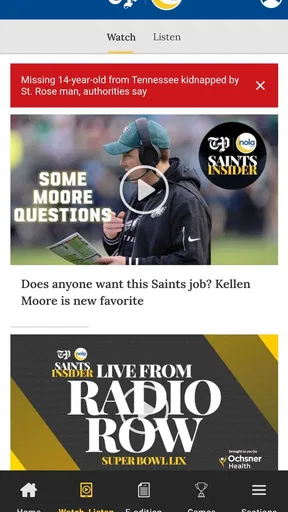

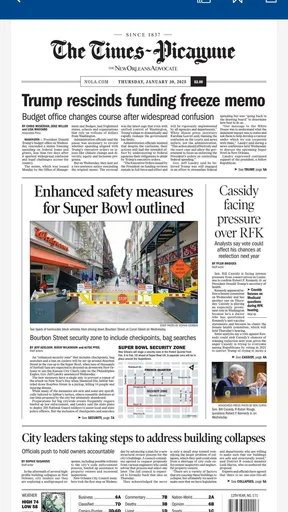
Our Review of NOLA.com
 Analysis by Appyee
I found NOLA.com most useful when I treated it as a focused local-news reader rather than a complete replacement for every news source on my phone. Its purpose is straightforward: bring New Orleans-area reporting into an Android app that I can open quickly, scan between errands, and return to when I want more context than a headline on social media provides. That narrow focus is also its main strength. If your daily questions are about what is happening around New Orleans, this app makes more sense than a broad national news application filled with stories that have little connection to your routine.
The app comes from Georges Media, the developer behind NOLA and The Advocate, and it sits in the News & Magazines category. It is free to install, aimed at a Teen audience, and has been available since February 18, 2011. The current release is version 4.1.0 and works on Android 8.0 or later. Those details matter because this is an established local publication app, not a short-lived experiment, although its age also means I approach it as a practical news utility rather than expecting a radically modern social-news experience.
How I use NOLA.com during an ordinary day
My baseline workflow is simple. I open the app when I want a local briefing, look through the main stream for stories that affect the area, and then decide whether a headline deserves a full read. I do not try to consume everything in one sitting. Local news can cover several unrelated subjects at once, so a quick scan works better than treating the front page like a single chronological conversation.
For example, I might check it before leaving home to see whether a developing local story could affect my route or plans. Later, I may return during a lunch break and read one article in full instead of repeatedly refreshing short posts elsewhere. In the evening, I use it differently: I look for follow-up reporting and details that were not useful during a rushed morning glance. That repeatable habit is more valuable than simply installing the app, because the app becomes a dependable checkpoint in the day rather than another source of notifications and distraction.
The strongest use case is someone who lives in the New Orleans area, works there, visits frequently, or has family and ongoing interests in the region. A local reader can get practical value from having area reporting in one place, especially when national apps barely mention neighborhood-level developments. I also think it suits former residents who want a regular connection to the city without building a complicated collection of feeds.
People outside the region can still use it, but the benefit depends on their reason for opening it. If you are researching New Orleans, following local events, or keeping up with a place you plan to visit, a dedicated local source can offer more relevant context than a general news feed. If you only want national headlines, international coverage, business news, or a broad mix of subjects, this is probably too narrow to be your primary news app.
One important distinction is the difference between a local publication app and a social feed. On a social platform, I may see a dramatic sentence or a video before I know what happened, who is involved, or whether the information has been updated. Here, the useful habit is to move from headline to article when the subject affects a decision. That extra step takes longer, but it reduces the temptation to treat a fragment as the whole story.
I also prefer using the app for deliberate reading rather than leaving it open constantly. Constant checking can turn any news tool into a source of background anxiety. A couple of planned visits gives me a clearer sense of what has changed while leaving enough distance to read carefully. For local news in particular, that balance helps because the most important detail is not always the most attention-grabbing phrase in the headline.
Settings and account choices worth checking first
When I set up a news app, I first look for controls that affect how often it interrupts me, how articles open, and whether the reading experience fits my phone. With NOLA.com, I would make that check before settling into a routine. The goal is not to turn every possible option on; it is to make the app serve a specific habit. If I want a morning briefing, I should not allow the app to compete with every other alert during the day.
Notification choices deserve particular attention. Local reporting can be time-sensitive, but not every update needs to arrive immediately. I would keep alerts limited to the kinds of stories I genuinely want to know about quickly and rely on manual visits for everything else. This is especially useful for readers who already receive messages from weather, transit, work, and social applications. A local news app is more helpful when its alerts remain meaningful instead of becoming part of the noise.
I also check the device-level Android notification settings after making choices inside the app. The two layers can produce different results, and Android controls can silence or limit an app even when the app itself appears configured correctly. If alerts are important to you, test the arrangement with a normal day rather than assuming the first setup is ideal. If alerts are not important, disabling them at the system level is a quick way to protect your attention.
Another setting-related habit is reviewing storage and data behavior through Android rather than assuming that every news reader behaves the same way. Articles and media can make a reading session feel heavier than a plain text feed, particularly on a limited mobile connection. I prefer opening longer pieces when I have a stable connection and keeping casual headline checks brief when I am traveling. That is not a criticism of this particular app so much as a sensible way to use any media-rich local publication app without surprises.
Privacy and permissions are also worth reviewing in the normal Android settings. I do not grant access automatically just because an app is familiar. I look at what the phone requests, decide which permissions fit the way I intend to use the reader, and revisit those choices if my habits change. A person who only wants to read articles should make sure the app is not receiving access that has no clear connection to that purpose.
The in-app purchase range is from $19.99 to $149.99 per item, so I would be especially careful around subscription or premium-reading prompts. The app is free to install, but free installation does not mean every part of the publication experience is necessarily included without a purchase. Before confirming anything, I would read the wording on the purchase screen and check whether the proposed payment matches what I actually want. That is a practical step for anyone sharing a device or allowing family members to use it.
Because the app has a Teen content rating, parents and younger readers should still use their own judgment about which local stories are appropriate. News can involve crime, emergencies, politics, accidents, and other difficult subjects even when the application itself is easy to navigate. The rating is a useful starting point, not a substitute for family settings or conversation about media habits.
Faster reading patterns that make the app more useful
The first speed improvement I use is a two-pass scan. On the first pass, I read only headlines and identify stories connected to my immediate interests. On the second, I open just the articles that could change a plan, explain a developing event, or provide local context I cannot get from a short alert. This prevents me from spending equal time on every item and makes the app feel much less demanding.
A second pattern is to separate “need to know” from “want to understand.” A road-related or emergency story may deserve a quick check before I leave, while a longer civic or community story can wait until I have time to read it properly. Mixing those two purposes in one hurried session often leads to shallow reading. Keeping them separate helps me use the same app for both immediate awareness and slower local understanding.
I also avoid opening every article from an external notification. If an alert points to a subject I care about, I use it as a reason to enter the app and inspect the surrounding coverage. That small change gives me more context than following isolated prompts one by one. It is particularly useful when several updates concern the same event and the newest alert is not automatically the most informative piece.
For recurring interests, I build a mental shortlist rather than repeatedly searching at random. My shortlist might include local government, community changes, weather-related developments, or a particular neighborhood concern. When I open the app, I know what to look for and can leave once those priorities are covered. This is an advanced habit in the sense that it depends on consistency, not on a hidden feature: the app becomes faster because I have defined my reading goals.
Another useful trade-off is reading on a larger screen when an article demands concentration. The Android app is convenient for quick checks, but a phone is not always the best place for a long piece or a story with several layers of context. I use the mobile app for discovery and immediate reading, then choose a more comfortable device when I want to study a complicated subject. That keeps the app in its strongest role instead of judging it for a task better suited to a larger display.
I would not use screenshots or copied headlines as a substitute for revisiting an article later. News changes, and an early summary may not represent the final shape of a story. My better habit is to remember the subject and return to the source when I need the latest explanation. This is one reason I value a dedicated local publication more than a stream of detached reposts: the original article is the place I can check for fuller context.
Where the app reaches its limits
NOLA.com is not the right answer for every news routine. Its regional focus is excellent when New Orleans-area coverage is the priority, but it cannot replace a broader national or international reader. I would pair it with another source if my work or interests require markets, world events, science, technology, or coverage from several cities. Installing it does not eliminate the need to choose a wider source; it gives the local part of that mix a clearer home.
It may also disappoint readers who want a highly personalized, algorithmically arranged feed. I prefer a local publication app when I want editorially selected regional coverage, but someone who expects every story to be ranked around a detailed personal profile may find the experience less tailored than a large aggregator. The trade-off is worth it to me when relevance means “important to this place” rather than “similar to what I clicked yesterday.”
Another limitation is the possibility of interruption from commercial or purchase-related elements. A free news application has to support its publication in some way, and readers should be prepared to encounter prompts that are not part of the article itself. I do not consider that automatically disqualifying, but I do think it changes how I judge the experience. If uninterrupted reading is your top priority, a paid publication arrangement or a cleaner reading tool may suit you better.
Performance expectations should also be realistic. News apps depend on changing content and network conditions, so a poor connection can make the experience feel less immediate than a locally stored reading app. When I need dependable access during travel, I plan around connectivity instead of assuming that a live local-news feed will always behave like an offline notes application. That distinction is easy to overlook until the moment a story matters.
The app’s age and current version suggest a product that has had time to remain available, but I would not choose it solely because it has existed for a long period. What matters in daily use is whether the current experience supports your reading rhythm on your particular phone. Older Android devices that meet the minimum requirement may run it, yet the practical feel can still vary depending on the device, connection, and other applications running at the same time.
Its audience size gives me some confidence that it is not an obscure local experiment: it has passed one hundred thousand installs, with an average score of 3.9 from around two thousand ratings and 651 written reviews. I read that as a mixed but useful signal. The app is established enough to attract a meaningful audience, while the rating reminds me that convenience and satisfaction will vary. I would treat those figures as context, not as a guarantee that the app will fit every Android setup.
Who should install it and who should look elsewhere
I would recommend NOLA.com to a New Orleans-area reader who wants one direct place to check local reporting several times a day. It is also a sensible choice for someone who is tired of discovering local stories through fragmented social posts and wants to read the source instead. The best match is a person willing to spend a few minutes scanning, opening important articles, and adjusting notifications to avoid overuse.
I would be more cautious about recommending it to someone who wants one application for all news. That reader will probably be happier with a broad aggregator or a national publication that also offers local sections. I would also suggest looking elsewhere if offline reading, extensive customization, or a completely ad-free interface is more important than regional focus. NOLA.com earns its place through local relevance, not through being the most universal news tool.
For families, the Teen rating makes the app a possible shared source, but I would still configure notifications and discuss difficult subjects with younger users. For travelers, it can be useful before and during a New Orleans visit, especially when local developments affect plans. For former residents, the app can support a lightweight connection to the area without requiring constant social-media monitoring. Each group benefits for a different reason, and none needs to read every article to get value.
My verdict after building a repeatable habit
My final view is that NOLA.com works best as a focused local checkpoint. I would install it for New Orleans-area awareness, limit interruptions, scan with a clear purpose, and open full articles only when the subject deserves attention. That approach makes the free app feel more useful than simply tapping through headlines whenever boredom appears.
The experience is not flawless. A regional reader still needs another source for wider coverage, purchase prompts may affect the free experience, and live news is naturally less convenient on a weak connection. The average rating of 3.9 reflects a product that is useful without being universally loved. I see that as a fair description: it does a specific job, and the job is valuable when it matches your location and interests.
After using it this way, I would recommend it to a friend who wants local reporting without building a complicated news system. I would say, make the app fit your routine instead of letting it dictate your attention: check it at planned times, keep alerts selective, and use a broader publication alongside it when your interests extend beyond New Orleans. With those expectations, this Android news app is a practical companion for staying connected to the area and a poor choice only when you are asking it to be something broader than a dedicated local source.
Verdict
Strengths of NOLA.com
- Fast access to breaking news across New Orleans and Louisiana.
- Strong coverage of local politics, crime, sports, and community events.
- Push alerts help you stay informed about major regional developments.
- Includes photo galleries, videos, and multimedia reports.
- Clean layout makes browsing recent stories relatively straightforward.
Limitations of NOLA.com
- Some articles may require a subscription or offer limited free access.
- Frequent notifications can feel excessive unless carefully customized.
- Coverage is highly regional and less useful outside the New Orleans area.
- Advertising and promotional content may interrupt the reading experience.
- App performance and loading times can vary with connection quality.
Other Releases by Georges Media (NOLA, The Advocate)
View All
The Advocate
News & Magazines3.7
Similar Picks in This Category
View All
Google News - Daily Headlines
Google LLC4.0

X
X Corp.4.8

Flipboard:Your Social Magazine
Flipboard3.4

Opera News: breaking & local
Opera4.5

Hindi News by Dainik Bhaskar
Dainik Bhaskar Group4.0

Way2News Daily News App
Way2News ( Formerly Way2SMS )4.6
Frequently Asked Questions
What is the NOLA.com app used for?
NOLA.com is a news app focused on New Orleans and the surrounding Louisiana region. It provides access to local breaking news, politics, crime reports, weather updates, business coverage, entertainment, sports, food, and community stories. After exploring the app, its main strength is helping readers follow regional events in one place, especially when local developments change quickly throughout the day.
Is the NOLA.com app free to download and use?
The app can generally be downloaded without an upfront charge, allowing users to browse available news and features. However, some articles or premium content may require a subscription, account, or access through a digital membership, depending on the current publisher policy. Before downloading, users should review the app-store listing and subscription terms because access limits and pricing can change.
Does NOLA.com require an account or subscription?
You may be able to open the app and read some content without creating an account, but registration can be useful for managing preferences, saving articles, receiving personalized alerts, or accessing subscriber-only stories. Certain content limits may also apply to non-subscribers. If you are considering a paid plan, carefully check renewal details, billing frequency, cancellation rules, and what benefits are included.
What types of notifications does NOLA.com send?
NOLA.com may send push notifications about breaking local news, severe weather, major traffic or public-safety events, sports results, and other important regional updates. Notifications can be helpful when you want immediate information, but frequent alerts may become distracting. After installation, review the notification settings and disable categories you do not need while keeping urgent news or weather alerts enabled.
Is NOLA.com useful for people who do not live in New Orleans?
Although the app is primarily designed for New Orleans and nearby Louisiana communities, it can still be valuable for former residents, travelers, students, relatives, and anyone following events in the region. Its coverage of local culture, restaurants, festivals, sports, weather, and public affairs offers useful context. Readers seeking broad national or international reporting may need to use it alongside another news app.
